

lets start our exercise by opening Creo Parametric. I will suppose you have very basic knowledge of sketching and part modeling before starting this exercise.
First Make a rectangle of 100 x 50 dimension in sketch and extrude it Up the depth of 10 units. depth dimension is not case sensitive. Your part after extrude should looks like this

now select the front surface of your solid plate and click on sketch button so you can sketch a feature for our exercise.
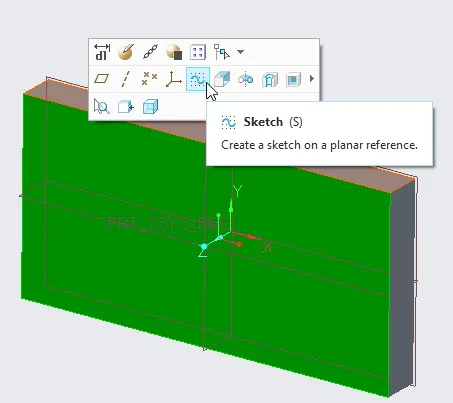
In sketching window, sketch a circle near to the bottom-left corner of the plate.
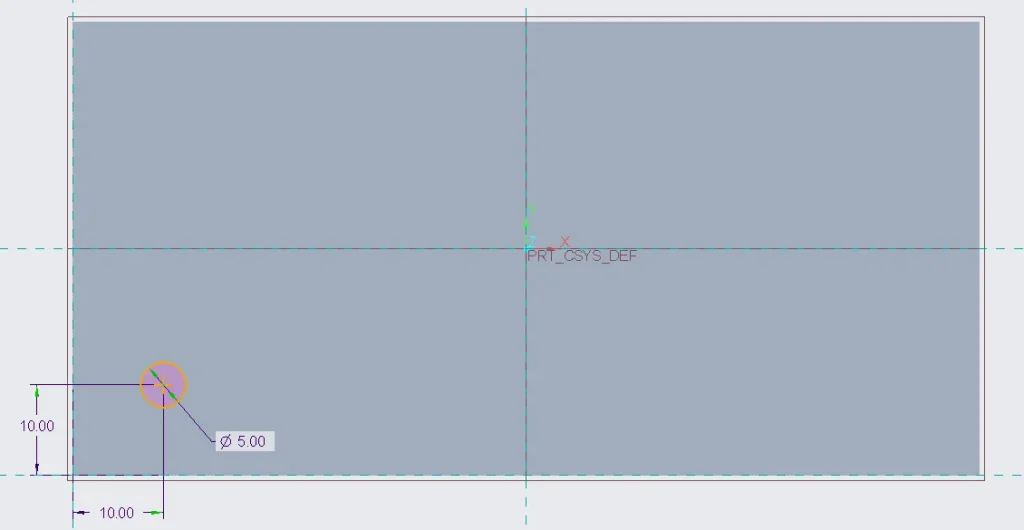
after creating this second sketch, just click on ok button in sketching window. now click on the extrude button.so we can extrude this circle in up to the height of 10 units.

After creating it, now select the new small cylinder that you just made above and click at the pattern button.

in pattern dashboard select “dimension” as a pattern feature. Before moving forward you can observe there are 4 dimensions associated with small cylinder. i am mentioning dimension names to make selecting more easy
- Diameter ( in following figure it is mentioned as d13)
- distance from left-edge ( in following figure it is mentioned as d11)
- distance from bottom-edge ( in following figure it is mentioned as d12)
- height of small cylinder ( in following figure it is mentioned as d14)

Now select the dimension(s) which you want to use in pattern. to select multiple dimensions, press “Ctrl” key and select the dimensions using mouse clicks. in above figure, you can also see that there are options for “direction 1” and “direction 2” and we will use both of these in this tutorial.

in above figure you can see that i have selected 3-diemensions in both “direction 1″ and direction 2”. also if you look closely, you will notice that i have selected cylinder diameter, cylinder height and distance from left-edge and have assigned increments to each of them.
so in “direction 1” i am trying to increase diameter of cylinder by 1 unit, increase the height of cylinder by 1.5 units and increase the distance from left-edge by 12 units in successive cylinders created by pattern.
in “direction 2” i am trying to decrease diameter of cylinder by 0.5 unit, increase the height of cylinder by 1 unit and increase the distance from bottom-edge by 12 units in successive cylinders created by pattern.
In pattern dashboard (see above figure), provide number of objects, required, in each direction. i am creating 4 objects (cylinders) in each direction.
after completing above step now just click at ok button to complete the pattern. your part should be look like as the figure shown below.
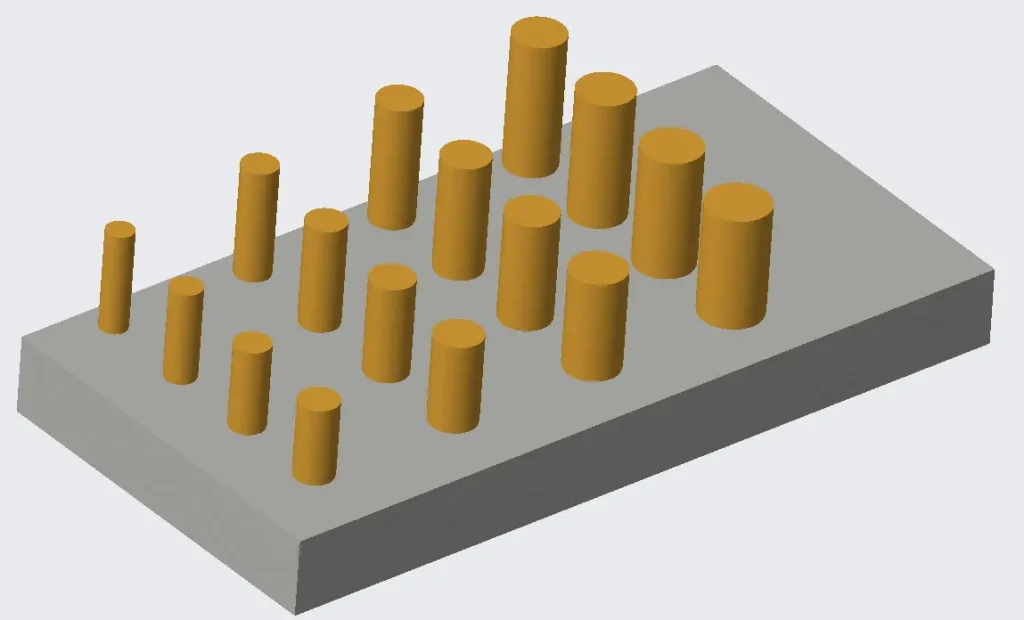
you can observe in above picture that cylinder diameter in increasing from left to right while it is decreasing from bottom to top. but the height is increasing from left to right as well as from bottom to top.
Share it

Leave a Reply